
Quick answer: add the streams, allow for other use, then measure
There is no single internet speed that guarantees smooth IPTV for every household. Start with the documented or measured bandwidth of the streams you will watch simultaneously, add other concurrent internet use and allow a clearly stated margin for variation. Then test sustained performance at the viewing device during the hours you actually watch television.
Resolution is a useful starting question, but it is not a bitrate measurement. Encoding, frame rate and the service's delivery settings can differ. For context, YouTube's official guidance lists approximately 5 Mbps for 1080p and 20 Mbps for 4K viewing, while Netflix's guidance lists 5 Mbps for 1080p and 15 Mbps for 4K. These are those services' recommendations, not verified CanadianIPTV stream requirements.
This guide supplies a planning method, worked examples and a measurement worksheet. Its household scenarios are illustrative calculations, not results from a CanadianIPTV laboratory or a promise that a particular broadband plan will work. CanadianIPTV publishes the guide and sells subscriptions through this website; confirm the actual requirements of any service before choosing a plan.
Understand the four different numbers in the discussion
The advertised speed of a broadband plan describes an offer from the internet provider. The speed measured at the router describes a particular test at that point. The speed measured at a television or streaming box includes the path to that device. The bitrate of the video describes the data required by the stream itself. These numbers answer different questions.
A household may have a high advertised plan speed while a television in a distant room receives a much less consistent connection. Another household may have a modest plan that comfortably carries its actual viewing load. Neither observation proves that a particular plan category is always sufficient or always insufficient for IPTV.
Keep the units clear. Mbps means megabits per second, a rate. GB usually describes an amount of data. A monthly data allowance and a connection's transfer rate are separate limits. A connection can be fast enough for a stream while the household still needs to consider how much data repeated viewing consumes over a month.
When recording a number, attach its context: where it was measured, when, with which tool and under what household load. “The television measured 42 Mbps at 8 p.m. on Wi-Fi” is more informative than “I have 500 internet.” The first statement is evidence from a particular test; the second usually describes a purchased plan.
Obtain a useful stream requirement
Ask the service provider for documented requirements for the exact quality and number of streams you intend to use. Find out whether a stated figure is a minimum, a recommendation with margin or an observed bitrate range. Those are not equivalent, and adding another arbitrary margin to a recommendation may double-count an allowance already included.
If the player exposes technical playback information, record the labels and values it actually shows. Do not assume a number labelled resolution or buffer is a bitrate. If the measurement is unclear, ask the app publisher what it represents. A misleadingly interpreted statistic can be less useful than an honest note that the stream's bitrate is unknown.
Where reliable router monitoring is available, it may help you observe traffic during a controlled playback session. Isolate the test as far as practical and acknowledge that the device can generate traffic other than video. The result is an observation of that session, not a permanent requirement for every programme delivered by the service.
If you cannot establish a service-specific requirement, keep the calculation provisional. Use clearly labelled assumptions to compare household scenarios, then validate them through a permitted trial or supported playback test. Do not relabel another streaming company's published figure as a CanadianIPTV specification just because both services use the same resolution label.
Count simultaneous viewing, not the number of installed apps
List the streams that are likely to play at the same time. Two televisions used at different hours do not create the same simultaneous load as two televisions showing different programmes together. A phone with the app installed but not playing should not automatically be counted as an active video stream.
Include special viewing arrangements explicitly. Multiview may open several streams on one screen. A recording process may run while someone watches something else. Check how the player and provider count those activities before testing, and stay within the actual service connection allowance. Network capacity does not create permission to exceed an account limit.
Write down normal and busy scenarios separately. The normal case might be one television while another person browses. A busy case might involve two televisions, a video call and a large download. Planning around the busy case can be sensible, but it should be a scenario the household actually expects rather than an invented maximum involving every device it owns.
| Household activity | Include when planning simultaneous use? |
|---|---|
| Television actively playing a stream | Yes, using its supported or measured requirement |
| Second television switched off | No active video load from that screen |
| Multiview with several sources | Check how many streams are actually requested |
| Background recording | Include its active transfer and service allowance |
| Video call or cloud backup | Include relevant concurrent download and upload activity |
| Installed but idle player | Do not count it as a full video stream without evidence |
Build a transparent capacity estimate
Use this simple planning expression: add the assumed simultaneous video rates and other concurrent traffic, then multiply by an explicitly chosen allowance. The allowance is a planning choice, not a universal IPTV standard. It helps make uncertainty visible but cannot compensate for every possible source, device or network fault.
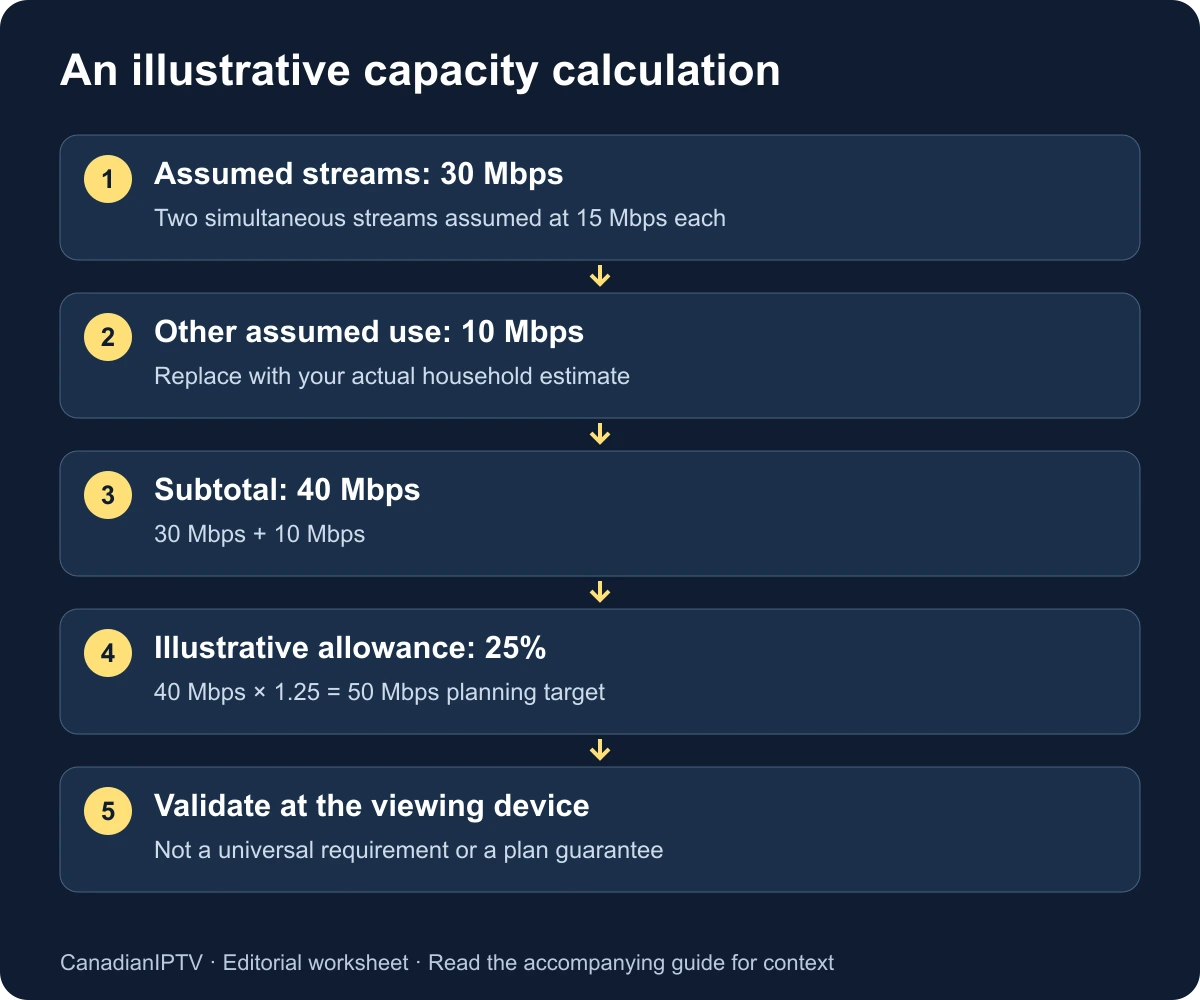
For example, suppose you assume two streams at 15 Mbps each and reserve 10 Mbps for other simultaneous activity. The subtotal is 40 Mbps. Applying an illustrative 25 percent allowance gives 50 Mbps: 40 multiplied by 1.25. This is an arithmetic example, not a recommendation that every two-screen household should buy a 50 Mbps plan.
The two 15 Mbps inputs are assumptions for this scenario. Replace them with the relevant service requirements or observations. Likewise, replace the 10 Mbps other-use allowance with a realistic household estimate. A video call, cloud backup and software download can have very different patterns; a single fixed number cannot describe all of them accurately.
| Illustrative scenario | Assumed video load | Other assumed load | With 25% allowance |
|---|---|---|---|
| One stream assumed at 8 Mbps | 8 Mbps | 4 Mbps | 15 Mbps |
| Two streams assumed at 15 Mbps each | 30 Mbps | 10 Mbps | 50 Mbps |
| Three streams assumed at 20 Mbps each | 60 Mbps | 20 Mbps | 100 Mbps |
These examples demonstrate calculation, not measured stream categories. The 8, 15 and 20 Mbps figures are deliberately labelled assumptions. Do not interpret the rows as guaranteed HD, 4K or provider-specific requirements. The useful outcome is a worksheet you can update when you learn more about your actual sources and household behaviour.
Compare the estimate with device-level evidence
Run a reputable speed test on the viewing device if a supported tool is available. If you must use a phone or laptop, place it near the television and record that it is a proxy measurement from different hardware. Do not present the laptop's result as though the television itself produced it.
Repeat the measurement at a quiet time and during a normal viewing period. Keep the test location and connection type consistent. Record whether other household devices were active. A single unusually high result is not enough to describe sustained evening performance, while one unusually low result should be investigated before becoming a permanent conclusion.
Use playback as a separate observation. A speed test transfers data to its own endpoint; the stream may travel through a different path and have different delivery behaviour. A strong test result helps describe available capacity but does not prove that a particular media source is healthy at that moment.
If the measured device capacity repeatedly falls below your realistic concurrent estimate, investigate the local path and household load. If capacity comfortably exceeds the estimate but playback still fails, a larger plan may not address the cause. Move to the buffering diagnostic guide to compare streams, devices and connections systematically.
Look beyond download throughput
Throughput is only one characteristic of a connection. Latency describes delay, jitter describes variation in delay and packet loss describes missing packets in the tested exchange. Cloudflare's speed-test methodology explains why its measurements include more than a headline transfer rate. Those results describe a test, not a verdict on a specific IPTV provider.
You do not need to become a network engineer to use the distinction. Record whether the connection remains steady under the household's normal load and whether interruptions coincide with another activity. Keep the actual readings rather than converting every variation into a claim of throttling or a defective service.
Upload activity deserves attention too. A household may be downloading video while another device sends a large backup or participates in a call. Record those activities during testing. The goal is to find a repeatable relationship, not to assume that every upload is harmful or that only download speed can matter.
Avoid setting universal pass/fail thresholds for every latency or jitter value without a service requirement and test context. A number from one endpoint and tool is not automatically comparable with a differently measured number elsewhere. Use consistent measurements to identify patterns and then seek the appropriate provider or device guidance.
Distinguish the broadband connection from the home wireless path
If possible, compare a supported wired connection with the normal Wi-Fi arrangement using the same viewing device and source. Keep the tests close together in time. An improvement on Ethernet is evidence that the local wireless path deserves attention; it does not by itself identify one specific router setting as the cause.
Where a wired test is impractical, record the router's location, intervening rooms and whether moving the device or a supported access point changes the result. Avoid making several wireless changes simultaneously. A useful test has a clear before-and-after condition and a result you can repeat.
Do not buy a faster broadband plan merely because a distant television has weak local performance. First determine whether the connection near the router differs from the viewing location. If the bottleneck is inside the home, additional capacity delivered to the router may leave the last part of the path unchanged.
Conversely, do not assume Wi-Fi is always the cause. If the same interruptions appear on a supported wired setup and across devices, preserve that evidence. The next question may involve household capacity, the internet path or the source. Let the comparison narrow the investigation rather than forcing it to confirm a preferred explanation.
Estimate data usage separately from speed
For a constant bitrate, a rough decimal data estimate is bitrate in Mbps multiplied by 0.45 to obtain GB per hour. The arithmetic converts bits to bytes and seconds to hours: one megabit per second sustained for 3,600 seconds is approximately 0.45 decimal gigabytes. This simplified calculation excludes additional overhead and assumes the rate remains constant.
At an illustrative constant 10 Mbps, one hour would therefore be about 4.5 GB before overhead. Two hours per day for 30 days would be about 270 GB. These numbers are arithmetic examples, not measured usage for a CanadianIPTV stream. Variable delivery rates, quality changes, retries and other device traffic can change the actual result.
| Assumed constant rate | Approximate decimal data per hour, before overhead |
|---|---|
| 5 Mbps | 2.25 GB |
| 10 Mbps | 4.5 GB |
| 20 Mbps | 9 GB |
If your internet plan has a data allowance, compare the estimate with actual usage reported by your provider over a representative period. Check the provider's units and billing treatment rather than assuming its meter exactly matches a player's display. Include other household use, not only television viewing, when considering the monthly allowance.
Use a repeatable household worksheet
Create one row per test session. Record the date and time zone, device, connection, chosen source and other active household use. Add the speed-test tool and result, then separately describe playback. Keep numerical readings and observations in different columns so a high speed result cannot silently become a “playback passed” mark.
| Field | What to enter |
|---|---|
| Date and local time | Include the time zone |
| Viewing setup | Exact device and player version |
| Connection | Wi-Fi or supported Ethernet arrangement |
| Active load | Number of streams and other known activity |
| Capacity test | Tool, endpoint if shown, result and measurement device |
| Playback observation | Stream, duration observed and interruption details |
| Change tested | One deliberate difference from the previous session |
| Interpretation | What the result suggests, and what remains unknown |
Use several representative sessions rather than trying to monitor continuously. The purpose is to support a decision with comparable evidence. If a problem occurs only during an event or at a particular time, include that condition where access and the trial duration allow it. Mark unavailable observations as not tested instead of assuming they would pass.
Decide whether an upgrade addresses the demonstrated problem
A broadband upgrade deserves consideration when repeated measurements and realistic household use show that available capacity is the limiting factor. Before choosing an offer, compare the provider's current terms, expected performance at your address, data allowance and total cost. This guide does not recommend a specific paid plan or claim that advertised speeds are guaranteed at your television.
If the evidence points to the local connection, compare the supported home-network options instead. If one device struggles while another works under similar conditions, investigate the device and player. If one source fails across otherwise working setups, collect a source-specific support report. Each finding suggests a different next expense or support conversation.
Retest after any meaningful change using the same worksheet. A purchase is not a successful fix merely because the new plan's number is larger. Confirm that the household task improved under the conditions that previously caused difficulty, and record any remaining limitation honestly.
For a new service, use the trial evaluation checklist to combine network observations with account, guide and usability checks. The installation hub covers the device setup that should be stable before you judge capacity. Good planning ends with a verified arrangement, not just a larger number on a bill.
Frequently asked questions
Is 25 Mbps enough for IPTV?
It depends on the actual stream requirements, concurrent household use and sustained performance at the device. Compare a documented or measured load with repeatable observations. A 25 Mbps plan name alone does not establish what the television receives or whether a particular source will play reliably.
Why does 4K not have one universal speed requirement?
Resolution describes picture dimensions, while the delivered data rate also depends on encoding and service choices. Official services publish different recommendations. Use the requirement for the actual service and quality setting instead of transferring one company's figure to every IPTV source.
Does having more internet speed improve picture quality automatically?
Additional capacity helps only when capacity was constraining delivery and the service can provide a suitable higher-quality stream. It cannot create detail absent from the source or add a format the device cannot handle. Compare actual playback and supported formats rather than assuming a plan upgrade changes the content.
Should I test on my phone or television?
Prefer a supported test on the viewing device when possible. A nearby phone is useful as a proxy, but label it accurately because its hardware and connection can differ. Pair the capacity measurement with a separate playback observation on the actual television setup.
Does a successful speed test rule out a service problem?
No. The test and the media stream may use different endpoints and delivery paths. A speed test provides evidence about that measured exchange. If playback fails, compare streams and supported devices and send a precise report rather than treating the throughput result as a complete diagnosis.