

Quick answer: test your real viewing routine before deciding
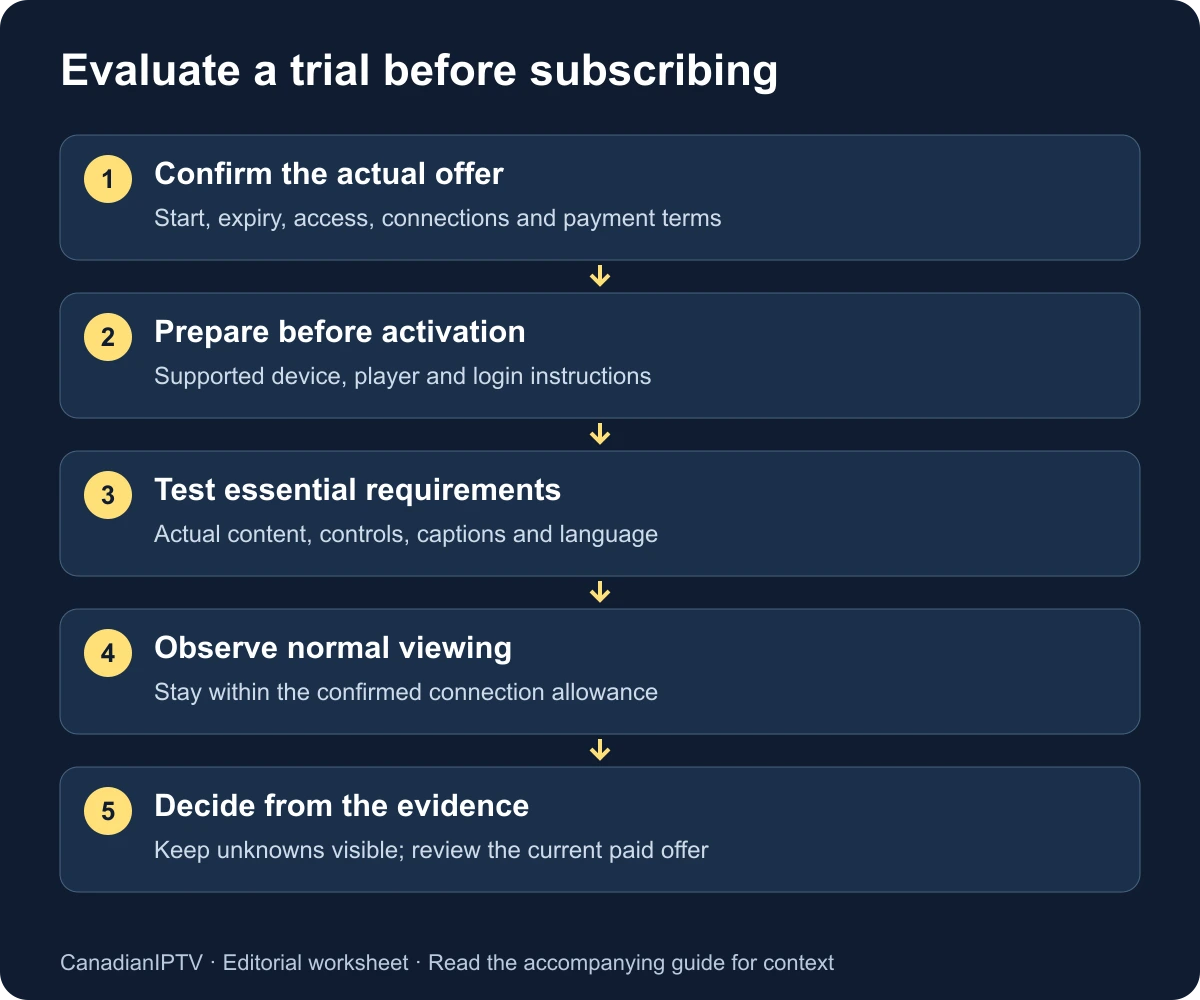
Use an IPTV free trial to answer a small set of practical questions: does the service work on your intended device, does the content you need actually play, can the household operate the guide and controls, and are the purchase terms clear? Test during a representative viewing period, record what happened and leave untested requirements unresolved instead of assuming they will work later.
Before activation, confirm the actual trial start, expiry, included access, connection allowance and any payment or renewal arrangement. This guide does not assume that CanadianIPTV or another provider offers a fixed number of trial hours, a specific channel count or a particular refund entitlement. Read the current offer and obtain clarification where it is incomplete.
CanadianIPTV publishes this checklist and sells subscriptions on this website. The worksheet is intended to make your own evaluation more useful; it is not an independent review of CanadianIPTV, a fabricated customer test or a guarantee of future performance. The examples are proposed test procedures, not observations from a trial we ran on your behalf.
Define what the household needs before the clock starts
Write down three to five requirements that would determine whether you subscribe. Make them specific enough to test. “Works well” is too vague; “the living-room television can open our usual programmes with readable captions and a usable guide during our normal evening viewing” gives you several observable tasks.
Separate essential needs from optional preferences. A particular language track or accessible control may be essential. An extra theme or an unfamiliar content category may be optional. A large catalogue should not outweigh a failed essential requirement, especially if most of that catalogue is content the household will never use.
Include the people who will operate the television. Ask which remote tasks they expect to perform and which devices they intend to use. If one person completes the entire trial on a phone while another will watch on a television, the trial may answer the wrong usability question even when playback looks fine.
Keep the list short enough to finish within the actual trial window. If an important event or viewing period falls outside that window, mark it as unavailable for testing. Ask the provider about an appropriate way to evaluate it, but do not describe it as verified merely because a different programme played successfully.
| Requirement | Essential or optional? | Evidence that would answer it |
|---|---|---|
| Intended television setup | Essential | App installs and opens the supplied account |
| Specific content or feed | Your choice | Actual playback of the named source |
| Captions or language | Your choice | Required track works on relevant content |
| Household navigation | Essential | Intended viewer completes ordinary tasks |
| Additional simultaneous screen | Your choice | Allowed by terms and tested if included |
| Clear purchase conditions | Essential | Current price, term and renewal arrangement understood |
Read the offer as carefully as the content list
Confirm what “free trial” means in the current offer. Check whether payment details are requested, whether the trial turns into a paid service automatically and what action is required if you do not want to continue. Record the start and expiry in your own time zone, particularly if activation happens through a support conversation rather than an automatic checkout.
Canada's Competition Bureau warns that some trial offers can lead to unexpected recurring charges and advises consumers to understand terms and retain records. Its subscription-trap guidance is a useful reason to check cancellation, renewal and payment conditions before entering card details. This is general consumer guidance, not a claim that any particular provider operates a scam.
Ask what the trial includes and what it excludes. A demonstration account may differ from a paid account in duration, concurrent connections or available features. Request a clear explanation of any difference that affects your essential requirements. A limitation can be acceptable if understood; an unanswered question should remain visible in your decision notes.
Identify the company receiving any payment and the support route for the service. Keep software-player purchases separate from provider charges. If the trial requires a paid player feature, include that additional cost in the evaluation and confirm who handles its purchase terms. A provider trial is not automatically a trial of every third-party app it can use.
Prepare the device without using up the trial unnecessarily
Before requesting activation, identify the exact television, streaming box or mobile device you will use. Check the provider's supported player and the publisher's current installation route. Complete ordinary device setup, available updates and account-store access where practical, so the trial does not disappear while you resolve an unrelated remote or HDMI problem.
Use the installation hub to choose the appropriate device path. If you intend to use Fire TV, verify the model and operating system through the Fire TV setup guide. Do not assume every device with the same broad brand name runs the same app or accepts the same download.
Make sure you know which login arrangement the provider supplies. A playlist URL, separate server credentials and an activation code require different supported forms. Ask for the exact player link and instructions if necessary. Avoid spending the trial guessing which similarly named app the provider intended.
Prepare a place to record observations, but keep passwords and playlist tokens out of it. A simple note or printed worksheet is sufficient. Save the verified support destination separately so you do not have to search for it while an issue is occurring. These small preparations help the trial measure the service rather than the quality of your note-taking under pressure.
Adapt the schedule to the actual available window
Do not use a rigid twenty-four-hour schedule unless the current offer actually provides that window. Instead, divide the available time into priorities: first establish access, then test essential content and controls, then include realistic household conditions. Leave a final period to review findings and ask a focused question before expiry.
For a short window, prioritise the intended device, a small content sample and the most important accessibility or language requirement. For a longer window, add a second representative viewing period and permitted household concurrency. These are planning suggestions, not statements about the duration of CanadianIPTV's current offer.
| Stage | Main task | Why it comes here |
|---|---|---|
| Before activation | Confirm terms, device and app | Avoid spending the trial on unrelated preparation |
| Initial access | Log in and play one source | Establish a basic working baseline |
| Core evaluation | Test essential content and controls | Answer the reasons you might subscribe |
| Representative use | Watch during normal household conditions | Check a realistic arrangement |
| Before expiry | Review gaps and purchase terms | Make an informed decision while questions are current |
If activation is delayed, confirm the expiry rather than assuming the advertised duration begins when you first manage to log in. Record the provider's response. A test window should be understood by both sides, particularly when support is resolving an initial account problem.
Establish a baseline on one device
Log in using the supplied method and select one source you are entitled to access. Confirm picture, sound and the ability to leave playback and return. Note the device, player version, connection type and time. Avoid changing advanced settings before you know whether the default supported arrangement works.
Then try another relevant source. If one works and another fails, preserve the distinction. If the entire account fails to load, focus on activation or login rather than judging the catalogue. The last successful step helps separate installation, account, guide and playback issues.
Record the observation in ordinary language. “The app returned to the home screen after selecting this programme” describes a crash. “The loading indicator remained visible” describes a different symptom. “Picture continued but sound stopped” is different again. Calling every problem buffering makes the support conversation less precise.
Keep the baseline simple, but do not mistake it for the whole trial. A few successful minutes establish that something works under those conditions. They do not demonstrate every feed, every evening or every household device. The remaining checklist turns that initial success into a more relevant evaluation.
Check the content you actually intend to watch
Prepare a small sample around the household's needs rather than scrolling through thousands of names. Include the specific regional feeds, languages or programme types that matter. Open the actual stream; a name, logo or guide entry is not evidence that the content plays correctly.
Record the visible source label and what appeared during playback. If a regional variant matters, verify that you selected the correct feed before reporting a schedule mismatch. Canada spans several time zones, and similarly named sources can carry different schedules. Distinguish an unexpected feed from an app clock problem.
Assess the picture on the intended television at the normal viewing distance. Do not call a stream measured 4K solely because the label contains “4K.” If the player reports technical information, note exactly what it says and avoid interpreting unfamiliar values as proof of quality. You can still record whether the picture meets your practical needs.
For on-demand or catch-up content, test those functions only if the current trial includes them and the source supports them. Check the beginning, ordinary navigation and return to the catalogue. A menu entry alone does not establish that every listed item is available, complete or included in the eventual paid offer.
Evaluate the guide and remote as everyday tools
Ask the intended viewer to find a favourite, open the programme guide, choose another source and return to playback. Observe where they become confused. If you must explain every button, record that the setup may need more configuration or a different player before it is suitable for that person.
Read guide text from the usual seating position. Check whether the selected item is obvious and whether the information corresponds to the feed being watched. A dense guide may contain plenty of information while remaining difficult to use from across the room. Test any supported display options that address the actual difficulty.
Create a small favourites list and reopen the app. Verify that it persists and is easy to find. If several people share the device, confirm how preferences are organised. Do not assume that several playlists automatically create separate household profiles or that a preference on one device synchronises everywhere.
Use the player comparison guide if the interface is the main obstacle. Keep that software decision separate from the service evaluation: another player may change navigation, but it does not automatically change the provider's content, account terms or source availability.
Treat captions and language as testable requirements
Choose content that is supposed to include the required audio or subtitle track and test it directly. Open the relevant control, select the track and confirm the result during playback. Record the programme and selected option. The presence of a subtitle menu is not enough to establish that captions exist for every stream.
For a bilingual household, distinguish app-interface language from content language. A French menu can display an English-only feed, and an English menu may still allow a French audio track where the source supplies one. Ask about the specific content rather than accepting a broad “French supported” statement without context.
If someone uses platform accessibility tools, include those tools in the ordinary navigation test. Note missing labels, unclear focus or tasks that require assistance. This checklist is not an accessibility certification of a player; it is a way to determine whether the actual arrangement meets the viewer's needs.
An essential accessibility failure should remain decisive even if optional features look impressive. Do not average it away with catalogue size or a low price. A service and player combination that someone cannot comfortably operate may be unsuitable for that household regardless of how it performs in another person's trial.
Include realistic network and household conditions
Repeat a relevant playback observation during your normal viewing period if the trial window allows it. Record other active household use, such as a second permitted stream, a video call or a large download. Keep within the provider's connection allowance; deliberately exceeding it does not create a fair performance test.
If playback interrupts, change one condition at a time. Compare another source on the same device, then another supported device or a wired connection where practical. Keep the tests close in time and write down the result. The buffering checklist provides a fuller sequence for locating the next useful comparison.
A speed test can add context, but it is separate from playback. Record the measurement device and tool rather than assuming a nearby phone exactly represents the television. The internet-speed guide explains how to combine capacity estimates with observations without treating an advertised plan number as a guarantee.
Do not infer long-term reliability from one successful session or permanent failure from one isolated interruption. Record what the trial actually covered. If the available window cannot answer a critical question, state that limit in the decision rather than claiming the uncertainty has disappeared.
Ask support one clear, useful question
If a genuine issue appears, send a focused report through the verified support route. Include the device, app version, connection, timestamp and last successful step. Explain one or two controlled comparisons. Keep credentials and full playlist addresses out of public messages and unredacted screenshots.
Evaluate whether the response addresses the question and helps you take a relevant next step. Record response times as your observation within that trial, not as a promise about every future request. Distinguish an automated acknowledgement from a reply that actually resolves or narrows the issue.
Avoid manufacturing a complicated fault merely to test support. A normal clarification about a supported player, connection allowance or actual trial expiry can be useful if the offer leaves that information unclear. Ask only what you need to decide and retain the answer alongside the current terms.
For CanadianIPTV service questions, use the contact page. For a third-party player purchase or platform-specific app problem, use the verified publisher route. Directing the question to the right company is part of a fair evaluation of the response.
Complete the decision worksheet without inventing a score
Use four states: meets the requirement, does not meet it, needs clarification and not tested. Add a short observation to each row. This is more useful than assigning a percentage that hides an untested essential task or combines unrelated requirements into a misleading overall score.
| Requirement | Result | Evidence or unresolved question |
|---|---|---|
| Intended device and player | Not tested | Record actual installation and login |
| Essential content sample | Not tested | Name the sources and observation times |
| Guide and remote use | Not tested | Record tasks completed by the intended viewer |
| Captions or required language | Not tested | Name the tested programme and track |
| Representative viewing period | Not tested | State the household conditions |
| Allowed additional connection | Not tested | Confirm allowance before testing |
| Purchase and renewal terms | Needs clarification | Save current offer and exact conditions |
| Support clarification, if needed | Not tested | Retain the relevant question and reply |
Choose the outcome from the essential rows. If they are met and the terms are acceptable, you have a reasoned basis to consider subscribing. If an essential requirement fails, identify whether a supported configuration change can address it. If it remains untested or unclear, defer the decision or explicitly accept that uncertainty rather than relabelling it a pass.
Review the purchase separately from the trial experience
Before paying, check the current price, currency, billing period, included connections, renewal arrangement and any stated cancellation or refund conditions. Confirm that the paid offer matches what you evaluated and understand any difference. Do not assume that deleting the player cancels a service subscription or that an app-store refund rule applies to a different provider.
Keep the offer, receipt and relevant support answers together. The federal Office of Consumer Affairs' contract guidance is a useful starting point for understanding why agreement terms matter. Specific rights and remedies depend on the applicable circumstances and jurisdiction; this checklist does not create a universal cooling-off or refund promise.
If you decide not to continue, follow the current offer's stated process where any action is required and retain the confirmation. Remove private service details from a device you will return or share. A completed trial should leave you with an informed decision and an organised account record, not an unexplained charge or forgotten credential.
The current trial page is the place to verify CanadianIPTV's available offer. Use this article as your evaluation method, then read the actual conditions at the time you apply. A useful trial answers your household's questions; it does not need to produce a purchase when the evidence or terms do not fit.
Frequently asked questions
How long should an IPTV trial last?
Use the duration actually offered and confirmed by the provider. A useful window should let you test your essential requirements, but this guide does not promise a standard number of hours. If a key viewing period is unavailable, record it as not tested and ask about an appropriate evaluation option.
Is a channel list enough to confirm availability?
No. Open the relevant source during the trial and record what plays. A name, logo or programme-guide entry does not prove current playback, the intended regional feed or the quality you expect. Focus on the content the household actually needs rather than a headline count.
Should I test several screens at once?
Only within the trial's confirmed connection allowance. Check whether the offer includes the arrangement you intend to use later. Network capacity, player installations and permitted simultaneous service connections are separate questions, so verify each before interpreting the result.
Does one successful evening prove long-term reliability?
No. It is useful evidence for that session and those conditions. Retain the observation without turning it into a guarantee. A trial can reduce uncertainty about suitability, but it cannot test every future event, software change or network condition.
What if the trial works but the terms are unclear?
Keep purchase terms as an unresolved essential requirement. Ask for the current price, billing period, renewal arrangement and relevant conditions before paying. Good playback does not answer those commercial questions, and there is no need to rush a subscription while they remain unclear.